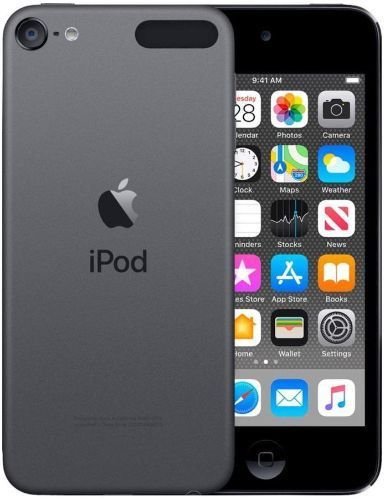
The venerable iPod Touch 6th Generation—a pocket-sized powerhouse from 2015 that still holds its own for music, light gaming, and app usage. If you're considering jumping into the world of this specific device, whether to buy one for nostalgic tunes or sell yours to make a little cash, you've landed in the right spot. This comprehensive guide will equip you with all the insights you need for smart buying and successful selling of a used iPod Touch 6th Gen.
At a Glance: Your Quick Takeaways
- Buying: Prioritize screen, battery health, and activation lock status. Look for model A1574.
- Selling: Clean, factory reset, and honest condition grading are key to maximizing your return.
- Platforms: Online buyback sites (like BuyBackWorld and uSell.com) offer convenience; marketplaces (eBay, Swappa) often yield higher prices but require more effort.
- Condition: Honesty about scratches, dents, and functionality directly impacts value for both buyers and sellers.
- Value: Prices fluctuate based on storage capacity, cosmetic condition, and current market demand.
Why the iPod Touch 6th Gen Still Matters: A Quick Refresher
Released in 2015, the iPod Touch 6th Generation (model A1574) was a significant upgrade, packing the powerful A8 chip (the same as the iPhone 6) and an 8-megapixel iSight camera. While certainly not the latest tech, its relatively modern internal components mean it can still run a surprisingly large number of contemporary apps, stream music effortlessly, and serve as an excellent dedicated media player or a kid's first iOS device without the cellular bill. It’s compact, lightweight, and often a budget-friendly alternative to a new smartphone. To truly appreciate its capabilities and history, you might want to Explore the iPod touch 6th generation in more detail.
Part 1: The Savvy Buyer's Playbook: What to Look For
So, you're in the market for a used iPod Touch 6th Gen. Smart move! These devices offer incredible value if you know what to scrutinize. Think of yourself as a detective, inspecting every detail to ensure you get a gem, not a lemon.
Understanding the A1574: Your Target Model
First things first, confirm you're looking at the right device. The 6th Generation iPod Touch is officially model A1574, released in 2015. While visually similar to the 5th Gen, the A8 chip and improved camera are distinguishing features. Always verify the model number in the device's settings (Settings > General > About > Model Number, you might need to tap it to see the Axxxx designation) or on the back casing.
Condition is King: A Visual Inspection Checklist
Cosmetic condition dramatically impacts value and indicates how well a previous owner treated the device. Don't skip these vital checks.
Screen & Display: The Window to Your World
- Cracks & Scratches: Minor hairline scratches are common and often acceptable on a used device. Deep gouges or spiderweb cracks, however, are red flags. They suggest a hard drop and could indicate underlying display issues.
- Dead Pixels & Discoloration: Turn the device on and display a few solid colors (white, black, red, green, blue). Look for tiny dots that are always off (dead pixels) or stuck on, as well as any yellowing, dark spots, or uneven backlighting.
- Touch Responsiveness: Open an app, drag icons around, pinch-to-zoom in photos. Ensure the entire screen registers touch accurately and without lag. Pay special attention to the edges.
Casing & Buttons: Feel the Quality
- Dents & Bends: Small dents are cosmetic. Significant bends, especially near the volume buttons or charging port, can mean internal damage. The iPod Touch is thin, making it susceptible to bending if mishandled.
- Scratches & Scuffs: The aluminum back is prone to scratching. Again, minor scuffs are typical, but deep gouges detract from value and appearance.
- Buttons (Home, Volume, Power): Each button should click firmly and respond consistently without sticking. A mushy or unresponsive button is a costly repair waiting to happen.
- Headphone Jack: Insert headphones and play some audio. Wiggle the jack gently to ensure a stable connection without static or cutting out.
Ports & Speakers: Connectivity and Sound
- Lightning Port: Connect a charger. It should seat snugly and begin charging immediately. Any wobbling or difficulty inserting the cable suggests a worn port, which can be expensive to fix.
- Speakers: Play music or a video. Ensure both internal speakers (if applicable, though typically one main speaker on iPod Touch) sound clear and aren't distorted, even at higher volumes.
- Microphone: Use the Voice Memos app to record a short clip. Play it back to confirm the microphone is clear and functional.
Camera: Capturing Moments
- Front & Rear: Open the Camera app and switch between the front and rear cameras. Take a few test shots and a short video. Look for any blurry spots, dust under the lens, or focusing issues.
- Flash: If available, test the flash to ensure it fires correctly.
Under the Hood: Software & Performance Checks
Beyond the visible, the device's internal health is paramount. Don't skip these crucial tests.
Battery Health: The Lifeblood of Your Device
This is arguably the most critical check for any used portable device.
- Initial Check: Go to Settings > Battery > Battery Health (if iOS version allows, otherwise look for general battery performance). Look for "Maximum Capacity" percentage. Anything below 80% will likely offer significantly reduced usage time, and you might experience unexpected shutdowns.
- Real-World Test: If possible, spend 10-15 minutes using the device (browsing, light gaming, music). A healthy battery shouldn't drop more than 5-10% during this period. Watch for sudden, rapid drops.
Wi-Fi & Bluetooth Connectivity: Stay Connected
- Wi-Fi: Connect to a known Wi-Fi network. Browse a few web pages, stream a video. Ensure a stable connection and decent speed.
- Bluetooth: Pair with a Bluetooth headset or speaker. Play some audio to confirm a stable connection.
Audio Test: More Than Just Speakers
- Headphone Output: As mentioned, test the headphone jack.
- Volume Control: Ensure the volume buttons correctly adjust the output.
Reset & Activation Lock: Your Ultimate Safeguard
- Activation Lock (iCloud Lock): This is the single biggest red flag when buying any used Apple device. If a device is Activation Locked, it means it's still tied to the previous owner's iCloud account and is essentially a brick to anyone else. Never buy an iPod Touch that is Activation Locked. The seller must deactivate "Find My iPod Touch" and erase all content and settings before you take possession. Watch them do it, or ensure it's factory reset and asks for a new Apple ID upon startup. If it prompts for a username and password, walk away.
Fair Price Hunting: What to Expect
The price of a used iPod Touch 6th Gen varies widely based on:
- Storage Capacity: (16GB, 32GB, 64GB, 128GB) More storage commands a higher price.
- Condition: "Mint" or "Excellent" devices are premium. "Good" or "Fair" will be considerably cheaper. "Broken" is for parts only.
- Seller: Private sellers often offer better deals than resellers with warranties.
- Market Demand: While consistent, demand can fluctuate.
Where to buy? - Online Marketplaces (eBay, Swappa): Offer the widest selection and competitive pricing, but require diligence in checking seller reviews and photos.
- Local Classifieds (Facebook Marketplace, Craigslist): Can yield great deals if you meet in person and inspect thoroughly. Always meet in a public, safe location.
- Refurbished Retailers: Often come with a warranty but are typically more expensive than private sales.
Part 2: Cashing In: Your Guide to Selling a Used iPod Touch 6th Gen
Got an iPod Touch 6th Gen gathering dust? Turning it into cash is easier than you think. A little preparation goes a long way in securing the best possible price and a smooth transaction.
Pre-Sale Prep: Maximizing Your Return
Think like a car dealer: presentation matters. These steps ensure your device is appealing, secure, and ready for its new owner.
Clean It Up!
A spotless device looks much more appealing in photos and in person.
- Exterior: Use a microfiber cloth and a gentle electronic cleaner (or just slightly damp cloth) to wipe down the screen and casing.
- Ports: Carefully use a toothpick or a soft brush to remove lint and dust from the Lightning port, headphone jack, and speaker grilles.
Backup & Wipe: Protect Your Privacy
This is non-negotiable for your privacy and the buyer's security.
- Backup: Connect your iPod to a computer and back it up via iTunes/Finder, or back up to iCloud (Settings > Your Name > iCloud > iCloud Backup).
- Erase All Content and Settings: Go to Settings > General > Transfer or Reset iPod > Erase All Content and Settings. This will completely wipe your personal data, apps, and settings, returning the device to factory condition. Do not skip this step.
Unlock/Disable Activation Lock: Crucial for Sale
As mentioned in the buying section, Activation Lock (Find My iPod Touch) must be disabled.
- Disable Find My: After erasing, ensure "Find My iPod Touch" is turned off from your iCloud account. If you can't access the device, you can remove it remotely via iCloud.com/find or through the "Find My" app on another Apple device. A buyer cannot use the device if this isn't done.
Grading Your Device: Honesty Pays
Be realistic about your device's condition. Overstating its quality leads to disappointment, disputes, and returns. Most selling platforms, especially buyback sites, use specific grading tiers.
- "Like New" / "Excellent": Flawless screen, no dents, very minor scuffs (if any) invisible from arm's length. Looks practically new.
- "Good" / "Fair": Light scratches on the screen, minor dents or scuffs on the casing. All functions work perfectly. This is where most used devices fall.
- "Broken" / "For Parts": Cracked screen, significant dents, non-functional buttons, battery issues, or other major defects. Still has value for its components.
BuyBackWorld emphasizes this: "Your device’s buyback value is based on various factors such as secondary market pricing, product condition and supply. Simply stated, as long as the product you send in matches the product and condition you checked out, you will receive the fully quoted value. That’s The BuyBackWorld Guarantee." This means accurate self-assessment is key to getting the payment you expect.
Where to Sell: Platforms & Strategies
You have several avenues to explore, each with its own pros and cons.
Online Buyback Programs: Convenience & Speed
These services specialize in purchasing used electronics quickly and efficiently.
- BuyBackWorld: A pioneer in the buyback space since 2009, BuyBackWorld offers a straightforward process. You get a quote online by selecting your model (iPod Touch 6th Generation model A1574 released in 2015), capacity, and condition. They provide a prepaid shipping label, and you'll get paid within two days of them receiving and inspecting your item. They are known for honoring their "Quoted Value" if your description matches the received item. This is a stress-free option for those who want cash quickly without the hassle of listing and dealing with individual buyers.
- uSell.com: Acting as a "price comparison engine," uSell.com connects you with reputable buyers offering the best prices for your 6th Generation iPod Touch. You tell them about your device, select the best offer, and get paid, often within 10 days. They screen their partners, adding a layer of trust to the transaction. This is a great starting point to gauge the market and find competitive offers without visiting multiple sites individually.
Pros: Fast, convenient, minimal effort, often includes free shipping, reputable buyers.
Cons: Usually offer slightly less than selling directly to an individual.
Online Marketplaces (eBay, Swappa, Facebook Marketplace): Higher Returns, More Effort
These platforms connect you directly with individual buyers.
- eBay: Largest online auction site. You can set a fixed price or let buyers bid. Offers broad reach but involves fees (listing, final value), and you're responsible for shipping and dealing with buyer inquiries/returns.
- Swappa: A marketplace specifically for gently used tech. They have stricter listing requirements and vet items for ESN/IMEI issues, offering a safer environment. Fees are reasonable.
- Facebook Marketplace: Great for local sales, allowing you to avoid shipping costs and meet in person. Be cautious about scams and always meet in a public place.
Pros: Potentially higher selling price, control over your listing.
Cons: Requires more effort (photos, description, communication, shipping), fees can eat into profits, higher risk of buyer disputes or scams.
Local Sales (Pawn Shops, Electronic Stores): Instant Cash, Lower Value
- Pawn Shops: Offer instant cash but will pay significantly less than market value.
- Local Electronic Stores/Resellers: Some may buy used devices, but their offers will also be lower as they need to make a profit margin.
Pros: Instant cash.
Cons: Lowest offers.
Navigating the Sale: Tips for a Smooth Transaction
Regardless of where you sell, these best practices will help ensure a successful outcome.
Clear Photos, Honest Descriptions
- Photos: Take high-quality, well-lit photos from multiple angles, showing both the good and any imperfections (scratches, dents). The more transparent you are, the more trust you build. Include a photo of the device turned on.
- Description: Be detailed and honest. State the model (A1574), storage capacity, and precise condition (e.g., "minor scratch on screen visible in direct light, otherwise excellent condition"). Mention if it comes with original box, charger, or accessories.
Setting a Realistic Price
Research completed sales of similar iPod Touch 6th Gen devices on eBay or Swappa to get a realistic sense of market value for your condition and capacity. Factor in any selling fees or shipping costs.
Shipping & Payment Safety
- Shipping (for online sales): Package the iPod securely in bubble wrap within a sturdy box. Use a tracked and insured shipping method. Keep proof of shipment.
- Payment: For online transactions, use secure platforms (e.g., PayPal for eBay/Swappa). For local sales, always prefer cash and count it carefully before handing over the device. Avoid checks or money orders from unknown parties.
Common Questions About Used iPod Touch 6th Gen
A few recurring questions often pop up when dealing with this specific model.
Is the battery replaceable?
Yes, the battery in the iPod Touch 6th Gen is technically replaceable, but it's an intricate process best left to professional repair services or experienced DIYers. Apple no longer officially services these older devices, so third-party repair shops are your best bet. Factor in potential battery replacement costs if you're buying a device with poor battery health.
Can it still run modern apps?
Thanks to its A8 chip, the iPod Touch 6th Gen can still run a surprisingly wide range of modern apps, including most streaming services (Spotify, Apple Music, Netflix), social media, and many popular games. However, it's limited to iOS 12.5.5, meaning very latest apps requiring iOS 13 or newer won't be compatible. For its core purpose as a media player and casual internet device, it performs admirably.
What's the difference between 5th and 6th Gen?
The most significant differences are internal. The 6th Gen boasts the faster A8 chip (vs. A5 in 5th Gen) and an upgraded 8MP iSight camera (vs. 5MP in 5th Gen), making it much more capable for modern apps and photography. Visually, they are very similar, both sporting a 4-inch Retina display and slim aluminum body. Always check the model number (A1574 for 6th Gen).
Your Next Step: Informed Decisions for Your iPod Touch
Whether you're looking to acquire a retro-modern media player or convert your old tech into new funds, navigating the used market for an iPod Touch 6th Gen doesn't have to be a guessing game. By meticulously inspecting devices, preparing yours for sale, and choosing the right platform, you're now equipped to make informed decisions. Remember, patience and thoroughness are your best tools in getting the most value, whether you're buying or selling. Good luck, and enjoy your iPod Touch journey!